
Share this
by Omnidots on Nov 14, 2024, 2:36:34 PM
Omnidots' SWARM products are known for being easy to use, install, and operate via the Honeycomb dashboard. But what goes on behind the scenes? How does a SWARM connect to a network and transmit your valuable data to the Honeycomb dashboard?
Your SWARM product can connect to the Internet in 3 different ways. The most common method is the cellular network. Each SWARM device comes with a preloaded SIM card that can connect to the Internet anywhere in the world, assuming a cellular connection is available in that location. If this is the case, the SWARM will also be able to connect via 4G and work immediately. By default, the SWARM is set to 'cellular mode' to work right out of the box. During 4G operation, the SWARM continuously monitors network availability to ensure optimal connectivity. This proactive approach guarantees that your device maintains the most reliable connection possible.
The second option is to use the SWARM via WiFi. Each SWARM comes with a unique WiFi password, which you can find and make visible when you connect a SWARM to a measuring point:
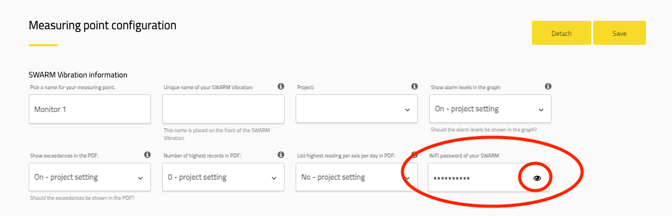
WiFi is often used where regular 4G connections are difficult to establish, such as in cellars or tunnels. Connecting your SWARM device via WiFi is an excellent option in these locations to ensure continued access to your data and real-time alerts. For instructions on switching your device from cellular to WiFi mode, please refer to our detailed User Guide.
For very remote locations without WiFi options, you can connect your SWARM via Power over Ethernet (PoE). Our SWARM Sound includes a PoE adapter, which is available as an optional accessory for our Vibration Monitor. The PoE adapter allows you to create a wired connection to a third-party 4G or WiFi-based router, providing both Internet connectivity and power. The SWARM can be placed up to 100 meters from the router for optimal connectivity and power distribution.